YouTube Channel Pro for Joomla Display YouTube videos, Shorts and playlists in a customizable responsive channel widget – no YouTube API key required
YouTube Channel Pro is a Joomla extension for displaying a YouTube channel directly on your website as a customizable widget, with channel information, videos, YouTube Shorts and playlists organized into dedicated content sections — no YouTube API key or coding required.
- ✅ No YouTube API key required
- ✅ Videos, Shorts and playlists in dedicated content sections
- ✅ Integrated visual builder with instant preview
- ✅ Custom responsive layout controls
- ✅ GDPR-Friendly Media Loading
🎬 Display a Complete YouTube Channel on Joomla
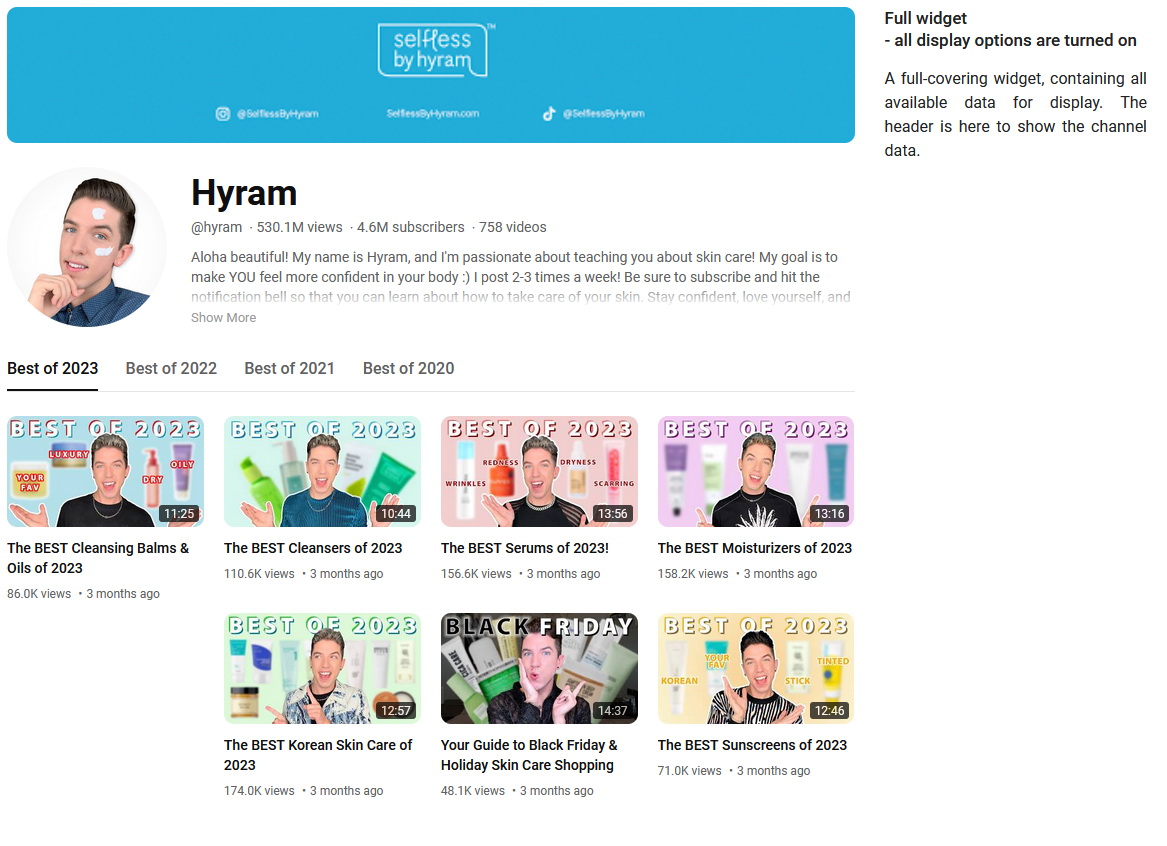
YouTube Channel Pro lets you bring more than a simple video gallery to your Joomla website. Create a complete YouTube channel widget with channel information, navigation and multiple types of video content in one integrated display.
The widget can display the channel cover image, logo, title, available channel statistics and description together with its videos, Shorts and playlists.
Individual channel header elements can be enabled or disabled, so you can create anything from a compact video gallery to a fuller representation of the YouTube channel.
📺 Videos and Shorts in Dedicated Sections
Organize YouTube content into separate navigation sections instead of mixing every type of content into a single gallery.
- Latest Videos — display the channel's most recently published videos
- Popular Videos — showcase popular videos from the channel
- Uploads — browse the channel's uploaded videos
- Latest Shorts — display recently published YouTube Shorts
- Popular Shorts — showcase popular short-form videos
- Playlists — let visitors browse the channel's playlists
Each section can be enabled or disabled independently. You can therefore build a widget focused only on regular videos, create a Joomla YouTube Shorts gallery, combine videos and Shorts, or provide access to the complete channel structure.
🎞️ YouTube Playlist Display and Filtering
Playlists have their own section inside the widget, giving visitors a clear way to explore videos grouped by the YouTube channel owner.
You can also control which playlists are available by including or excluding playlists that match specified keywords. This makes it possible to focus the widget on selected topics instead of showing every playlist from the channel.
🧩 Customizable YouTube Channel Header
Control how much channel information appears above the video content. The channel header can be displayed in full, simplified or disabled entirely.
Available display controls include the channel cover picture, logo, logo shape, title, available channel statistics and description. The navigation menu can also be shown or hidden independently.
This gives you control over whether the widget should resemble a complete channel page or act primarily as a video and Shorts gallery.
🎨 Video Gallery Styles and Display Controls
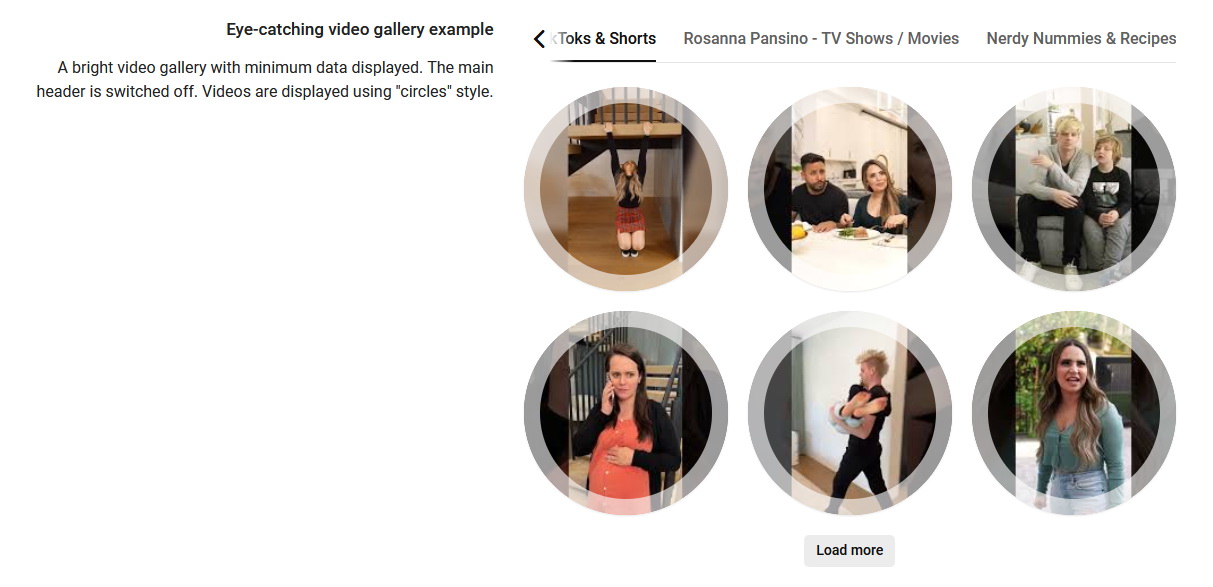
Choose how individual videos appear inside the gallery using several built-in presentation styles, including Default, Flipcards, Circles1 and Circles2.
You can also control the information shown for each video, including the title, description, available statistics and video duration.
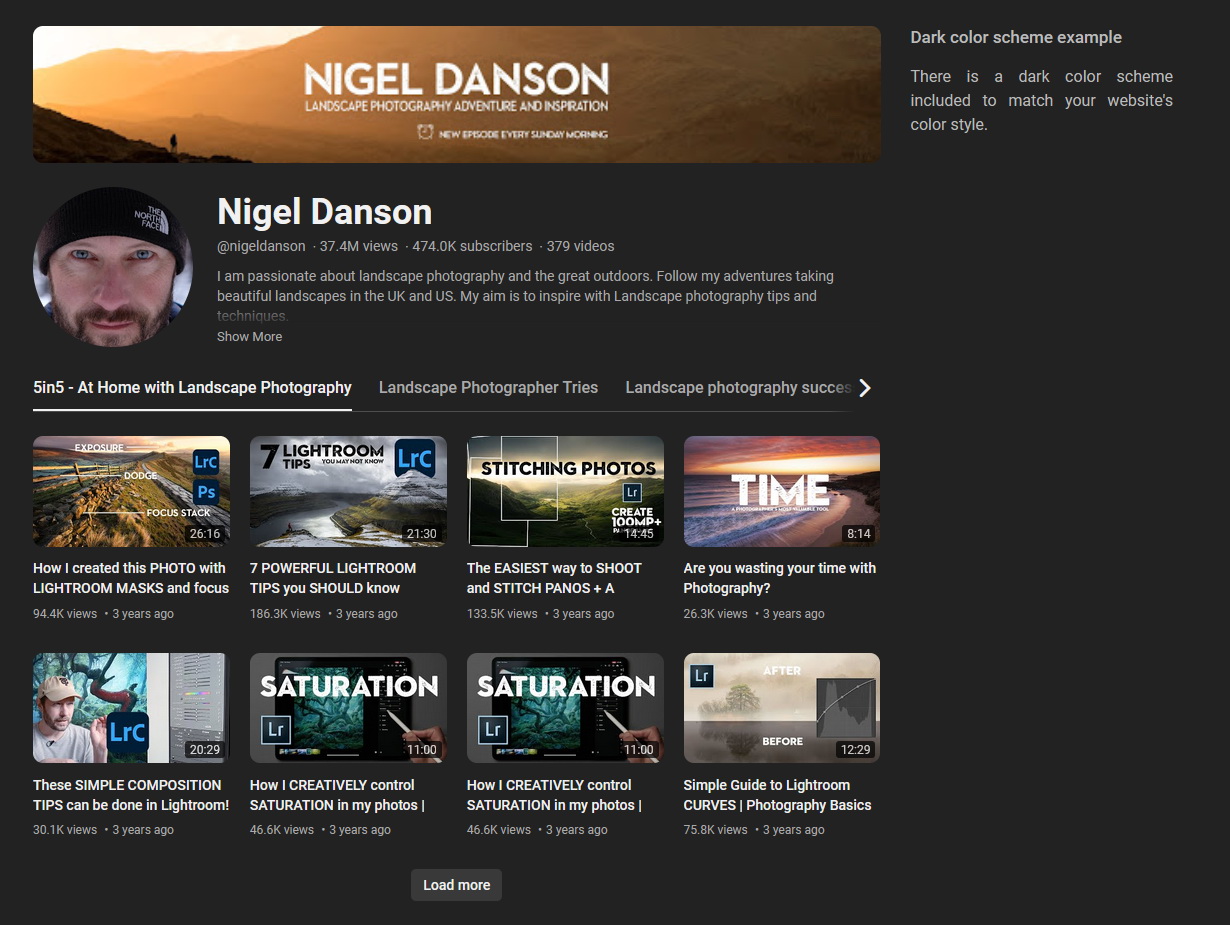
Additional display settings let you adjust thumbnail quality, background color, Light or Dark color scheme and the overall widget dimensions to better match your Joomla template.
📱 Responsive Layout Controls
Create a video layout that adapts to different screen sizes instead of relying on one fixed number of columns.
Configure the number of items per page, gallery columns and spacing between items, then define your own responsive breakpoints with a different number of columns for each maximum screen width.
For example, the same widget can use a multi-column gallery on a desktop, fewer columns on a tablet and a single-column layout on a narrow mobile screen.
⚙️ Integrated Visual Builder with Instant Preview
Configure your YouTube widget visually and see the result while you work.
The integrated builder displays a live preview alongside the settings, so changes to the channel header, menu, video layout, responsive behavior, colors and individual video elements can be reviewed before the widget is published.
No coding skills are required to create or customize the widget.
▶️ Flexible Video Playback
Visitors can browse the channel content directly from the widget and open individual videos for viewing.
Popup playback can be enabled when you want videos to play directly on the current page. If popup playback is disabled, visitors can still browse the channel content without loading the embedded YouTube video player inside the widget.
🛡️ GDPR-Friendly Media Loading
YouTube Channel Pro supports GDPR-Friendly Media Loading for YouTube images used by the widget.
When local media loading is enabled, supported YouTube images are downloaded by your Joomla website and served to visitors from your own server. This prevents the visitor's browser from connecting to YouTube servers simply to load those images.
GDPR-Friendly Media Loading applies to images only. Videos themselves are hosted by YouTube and, when played inside the popup player, are loaded from YouTube servers.
For a privacy-focused configuration that avoids direct connections to YouTube while visitors browse the widget, enable GDPR-Friendly Media Loading and disable the Play in popup option. With popup playback disabled, the widget does not embed and load the YouTube video player directly on your website.
GDPR compliance depends on the complete website configuration, legal basis, privacy policy and other services used. These settings specifically help prevent unnecessary connections to YouTube servers while the widget itself is being displayed.
📍 Place Your YouTube Widget Anywhere in Joomla
Every widget you create receives its own shortcode, making it easy to reuse the configured YouTube display wherever it is needed on your Joomla website.
- ✅ inside Joomla articles
- ✅ inside Custom HTML modules
- ✅ in template positions
- ✅ inside custom layouts or other content that supports the shortcode
You can create multiple widgets with different channels, content sections, layouts and display settings for different parts of the same website.
🧱 Built Specifically for Joomla
YouTube Channel Pro is installed and managed directly from the Joomla administration area. Select a YouTube channel, configure the widget in the visual builder, save it and place the generated shortcode where you want the channel content to appear.
YouTube Channel Pro can update data for up to 10 YouTube channels per domain per day. This limit applies only to retrieving fresh YouTube data, not to how many times a widget can be displayed or viewed by website visitors. After the daily limit is reached, widgets continue displaying previously cached data until new data updates become available.
❓ Frequently Asked Questions
Can I display a YouTube channel on a Joomla website?
Yes. YouTube Channel Pro lets you display a YouTube channel on Joomla with channel information, videos, YouTube Shorts and playlists inside a customizable widget.
Do I need a YouTube API key?
No. YouTube Channel Pro does not require you to create or configure a YouTube API key.
Can I display YouTube Shorts on Joomla?
Yes. The widget includes separate Latest Shorts and Popular Shorts sections, and each section can be enabled or disabled independently.
Can I choose which YouTube content sections are displayed?
Yes. You can independently enable or disable Latest Videos, Popular Videos, Uploads, Latest Shorts, Popular Shorts and Playlists.
Can I display and filter YouTube playlists?
Yes. Playlists have their own section in the widget, and you can include or exclude playlists that match specified keywords.
Can I customize the video gallery for different screen sizes?
Yes. You can configure items per page, columns and spacing, then create custom responsive breakpoints with a different number of columns for different screen widths.
Can I customize how individual YouTube videos are displayed?
Yes. You can choose from several video presentation styles and control whether the title, description, available statistics and video duration are displayed.
How can I reduce direct connections to YouTube servers?
Enable GDPR-Friendly Media Loading to serve supported YouTube images from your own Joomla server and disable the Play in popup option to prevent the YouTube video player from being loaded directly inside the widget. Videos remain hosted by YouTube.
Where can I display the YouTube Channel Pro widget?
Each widget receives a shortcode that can be placed in Joomla articles, Custom HTML modules, template positions, custom layouts and other content that supports the shortcode.
Reviews: 2
Alex G.
Easiest way to embed YouTube Channel in Joomla
MobiGroup
- Added Joomla 6.2.x compatibility
- Added translations: Čeština, Dansk, Español, Français, हिन्दी, Italiano, Nederlands, Polski, Português, 中文
- Fixed caching directory creation
- Added GDPR-Friendly Media Loading for YouTube images
- Fixed loader color for dark widget theme
- Added "Latest Videos"
- Added "Popular Videos"
- Added "Latest Shorts"
- Added "Popular Shorts"
- Changed widget menu
- Minor fixes
- Minor fixes
- Minor fixes
- Added Joomla 6.1.x compatibility
- Fixed "Call to undefined method... _getMediaURI" error
- Added Joomla 6.x support without compatibility plugin
- Maintenance Update
- Fixed error message upon installation on Joomla 5 and 6
- Added Joomla 6.x support
- Added Joomla 5.4.x support
- Improved checks upon installation process
- Small fixes
- API server request headers changed
- Added Joomla 5.3.x compatibility
- Fixed error when there are no playlists except uploads
- Small fixes
- Added "Uploads" playlist
- Added Joomla 5.2.x compatibility
- Small fixes
- Added Joomla 5.1.x compatibility
- Fixed error on widgets delete
- Small fixes
Please log-in to get access to the support.