
Many Joomla administrators assume that simply adding microdata to their site guarantees better search rankings and rich snippets. This misconception leads to frustration when results don’t materialize. The reality is more nuanced. Microdata is a powerful semantic markup language that helps search engines understand your content’s meaning and context, but it must be implemented correctly and paired with quality content. In 2026, understanding how microdata works within Joomla’s architecture and knowing when to use it versus newer alternatives like JSON-LD can significantly impact your site’s search visibility. This guide explains what microdata is, how to implement it effectively in Joomla, and best practices for maximizing its SEO benefits.
Table of Contents
- Understanding Microdata And Its SEO Value In Joomla
- Microdata Implementation In Joomla: Methods And Tools
- Comparing Microdata With JSON-LD: Which To Use In Joomla For 2026?
- Best Practices And Common Pitfalls In Microdata Use For Joomla Sites
- Explore Premium Joomla Tools To Enhance Your Microdata SEO
- Frequently Asked Questions
Key takeaways
| Point | Details |
|---|---|
| Microdata definition | Semantic HTML attributes that help search engines understand content structure and meaning within Joomla pages. |
| SEO advantage | Enables richer search results and improved click-through rates by providing clear context to search engines. |
| Implementation options | Manual HTML coding, Joomla extensions, or hybrid approaches depending on site complexity and maintenance needs. |
| Format comparison | JSON-LD offers easier maintenance than microdata, but microdata provides granular control for complex content structures. |
| Validation importance | Regular testing with Google’s Rich Results Test prevents errors that reduce rich snippet eligibility. |
Understanding microdata and its SEO value in Joomla
Microdata is a specification for embedding semantic information directly into HTML using specific attributes. Think of it as adding invisible labels to your content that explain what each piece represents. Microdata allows semantic annotation of HTML, enabling search engines to move beyond keyword matching and understand the actual meaning of your content.
The system works through three primary attributes. The itemscope attribute declares that a section contains structured data. The itemtype attribute specifies what kind of thing you’re describing using Schema.org vocabulary. The itemprop attribute labels individual properties within that item. For example, marking up a restaurant review in Joomla might include itemtype=“https://schema.org/Review” with itemprop values for rating, author, and date.
The SEO benefit is substantial and measurable. When search engines understand your content structure, they can display it more prominently in search results. A product page with proper microdata might show star ratings, price, and availability directly in search listings. An event article could display date, location, and ticket information. This enhanced presentation increases visibility and click-through rates. Studies show that structured data implementations improve click rates by providing users with more context before they click.
For Joomla sites specifically, microdata clarifies content types that might otherwise appear generic to search engines. Consider these scenarios:
- Article pages can be marked as BlogPosting or NewsArticle, helping Google understand publication context
- Product catalogs benefit from Product schema with pricing, availability, and review data
- Event listings gain visibility when marked with Event schema including dates and locations
- Local business pages use LocalBusiness schema to appear in map results and knowledge panels
Pro Tip: Focus microdata implementation on your most important content types first rather than trying to mark up everything at once. Start with pages that drive conversions or traffic.
The real power emerges when you consider how search engines use this information. Google doesn’t just display your content differently. It uses structured data to build its Knowledge Graph, answer voice queries, and populate specialized search features. A Joomla site selling premium Joomla modules and plugins could use Product schema to appear in shopping results, while a blog could use Article schema to qualify for Top Stories carousels.
One misconception deserves immediate correction. Microdata doesn’t directly improve rankings as a ranking factor. Instead, it improves how your existing content performs in search by making it more accessible, understandable, and visually appealing in results pages.
Microdata implementation in Joomla: methods and tools
Implementing microdata in Joomla requires choosing between manual coding and extension-based approaches, each with distinct advantages. The manual method gives you complete control but demands HTML knowledge and ongoing maintenance. Extension-based solutions simplify the process but may limit customization options.
Manual implementation involves editing your Joomla template files to add microdata attributes directly to HTML elements. You would modify files like article.php in your template’s component overrides, wrapping content sections with appropriate itemscope, itemtype, and itemprop attributes. This approach works well for custom designs or unique content structures not covered by standard extensions.
Common microdata attributes used in Joomla content templates include:
- itemscope and itemtype=“https://schema.org/Article” for blog posts and news content
- itemprop=“headline” on article titles to mark the main heading
- itemprop=“datePublished” on publication dates for temporal context
- itemprop=“author” with nested Person schema for bylines
- itemprop=“image” on featured images to specify visual content
Pro Tip: Validate microdata frequently using Google’s Rich Results Test to catch errors before they impact your SEO performance. Small syntax mistakes can invalidate entire markup blocks.
Microdata implementation enhances Joomla SEO by providing structured information that search engines can confidently interpret and display. The challenge lies in maintaining this markup as your site evolves. Template updates can overwrite custom code, and content changes might break carefully constructed schemas.

Extension-based implementation offers a more sustainable approach for many Joomla administrators. Several Joomla extensions and plugins automate microdata insertion based on content type and configuration. These tools typically add markup dynamically without requiring template modifications, making them more resilient to updates.
The main challenge with microdata is its inline nature. Unlike JSON-LD, which sits separately in a script tag, microdata interweaves with your HTML structure. This creates several issues. The markup clutters your template code, making it harder to read and maintain. Changes to your HTML structure often require corresponding microdata adjustments. Testing becomes more complex because you must inspect the rendered HTML rather than a standalone data block.
Extensions help by abstracting this complexity. They maintain a separation between your content and its semantic markup, automatically generating appropriate microdata based on rules you define. When you update an article or change a template, the extension regenerates the markup accordingly. This reduces maintenance burden and minimizes errors.
Consider your implementation strategy based on these factors. Choose manual coding when you need precise control over complex schemas, have strong HTML skills, and maintain a relatively static site structure. Opt for extensions when you prioritize ease of maintenance, work with standard content types, or lack technical resources for ongoing manual updates. Many successful Joomla sites use a hybrid approach, implementing critical schemas manually while using extensions for routine content.
The Google Rich Results Test tool should be your constant companion regardless of implementation method. Test every page type you mark up, check for errors and warnings, and retest after any significant site changes. This validation step prevents invisible errors that silently reduce your SEO effectiveness.
Comparing microdata with JSON-LD: which to use in Joomla for 2026?
The structured data landscape has shifted significantly since microdata’s introduction. JSON-LD has emerged as Google’s preferred format, and understanding the differences helps you make informed decisions for your Joomla site in 2026.
Microdata embeds structured data directly in HTML using attributes like itemscope and itemprop. JSON-LD places structured data in a separate script tag using JavaScript Object Notation. Both describe the same information using Schema.org vocabulary, but their implementation approaches differ fundamentally.
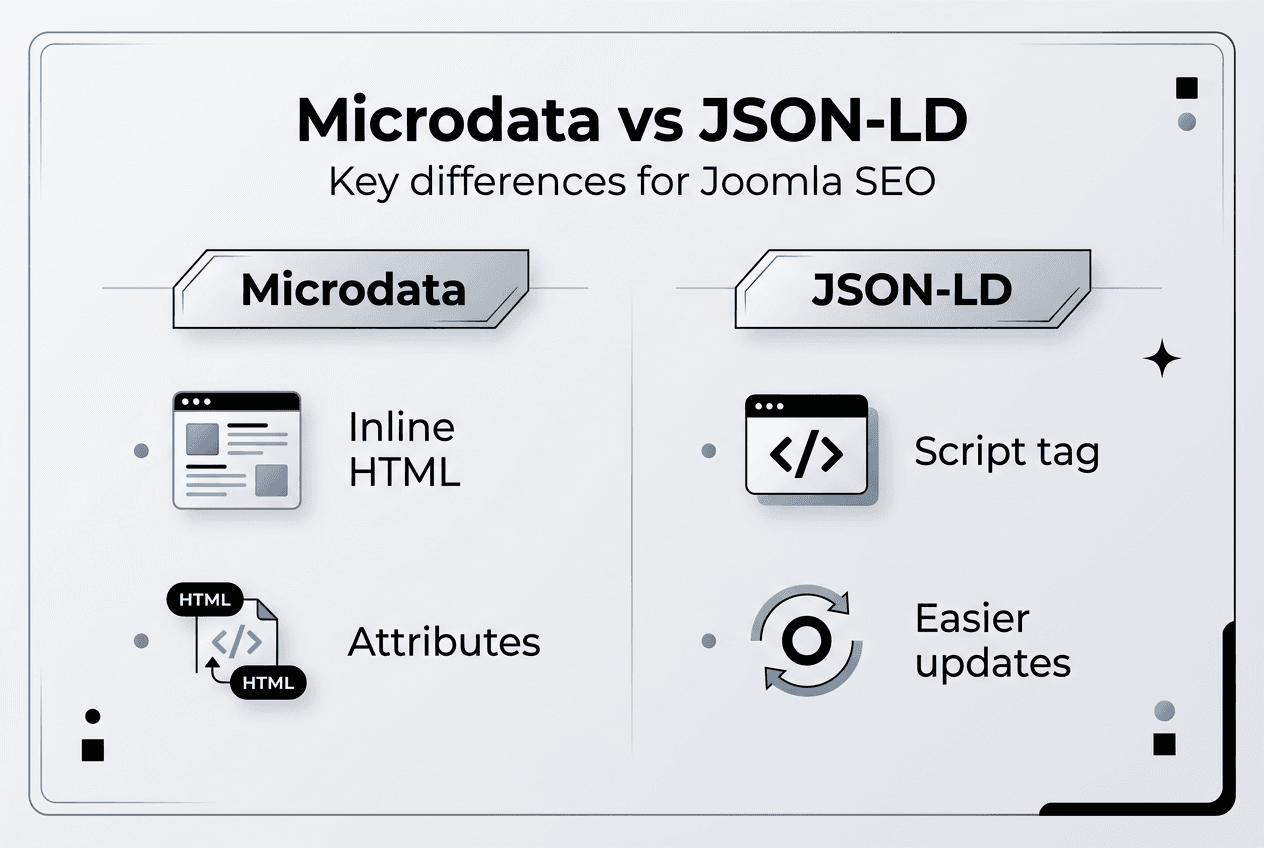
| Feature | Microdata | JSON-LD |
|---|---|---|
| Location | Inline HTML attributes | Separate script tag |
| Maintenance | Requires HTML changes | Edit standalone JSON |
| Template impact | Clutters markup | Clean separation |
| JavaScript compatibility | Breaks with dynamic rendering | Works with any framework |
| Google preference | Supported | Recommended |
JSON-LD offers several compelling advantages for modern Joomla sites. The format separates structured data from presentation, making both easier to maintain independently. You can update schema markup without touching your template HTML. This separation proves especially valuable when working with JavaScript frameworks like Vue or React, which many modern Joomla templates now incorporate. Microdata often breaks when JavaScript dynamically renders content, while JSON-LD remains unaffected.
The maintenance benefits extend beyond initial implementation. When Schema.org releases new properties or types, updating JSON-LD requires modifying a single script block. With microdata, you must hunt through template files finding every relevant attribute. Team collaboration improves because developers can work on templates while SEO specialists handle structured data independently.
Google recommends JSON-LD over microdata for structured data due to its separation from HTML and easier maintenance. This recommendation reflects practical realities of modern web development rather than any technical superiority in how search engines process the formats.
However, microdata retains specific advantages. It provides more granular control when you need to mark up complex, nested content structures where the relationship between elements matters. Some developers find microdata’s inline nature more intuitive because the markup sits directly adjacent to the content it describes. For sites with stable templates and straightforward content types, microdata’s directness can simplify implementation.
Migrating from microdata to JSON-LD safely requires careful planning:
- Audit your existing microdata implementation to document all marked-up content types
- Create JSON-LD equivalents for each schema type, ensuring property names match
- Deploy both formats simultaneously on a test page to verify Google reads both correctly
- Gradually roll out JSON-LD across your site while monitoring Search Console for errors
- Remove microdata only after confirming JSON-LD works correctly and appears in search results
Pro Tip: Deploy both formats during migration to avoid SEO disruptions. Google handles duplicate structured data gracefully, processing whichever format it encounters first.
For new Joomla sites launching in 2026, JSON-LD represents the better long-term choice. Its compatibility with modern development practices and Google’s explicit preference make it the safer investment. Existing sites with working microdata face a different calculation. If your current implementation works well and you lack resources for migration, maintaining microdata remains acceptable. Focus migration efforts on high-value pages first, and consider using Joomla structured data tools that support both formats to ease the transition.
The choice ultimately depends on your specific situation. Evaluate your technical capabilities, maintenance resources, template architecture, and long-term site plans. Both formats accomplish the same goal of helping search engines understand your content. The implementation method matters less than consistent, accurate markup that follows Schema.org specifications.
Best practices and common pitfalls in microdata use for Joomla sites
Successful microdata implementation requires avoiding common mistakes while following proven best practices. Many Joomla administrators undermine their SEO efforts through preventable errors.
The most frequent implementation errors include:
- Using outdated or deprecated schema types that Google no longer recognizes
- Syntax mistakes like missing quotes, incorrect attribute names, or malformed URLs
- Marking up content that doesn’t exist on the page, creating misleading structured data
- Nesting schemas incorrectly, breaking the hierarchical relationships between items
- Forgetting required properties that make schemas invalid or ineligible for rich results
Staying current with Schema.org vocabulary prevents the first problem. The organization regularly updates its specifications, adding new types and deprecating outdated ones. Subscribe to Schema.org announcements and review your implementation annually to ensure compliance with current standards. What worked in 2024 might need adjustment by 2026 as search engines refine their requirements.
Validation catches most syntax and structural errors before they impact your SEO. Incorrect microdata creates errors and reduces eligibility for rich snippets. Make validation part of your regular workflow. Test after initial implementation, retest after template updates, and spot-check periodically to catch issues introduced by content changes or plugin conflicts.
A critical misconception needs addressing. Microdata alone doesn’t guarantee rich snippets or enhanced search results. Google uses structured data as one signal among many when deciding whether to display rich results. Your content must also meet quality guidelines, provide genuine value to users, and comply with Google’s specific requirements for each rich result type. Perfect microdata on thin or misleading content won’t generate rich snippets.
Content quality matters as much as technical implementation. Focus on:
- Providing comprehensive, accurate information that matches your markup
- Ensuring marked-up content is visible to users, not hidden or misleading
- Following Google’s quality guidelines for specific rich result types
- Maintaining consistency between your markup and actual page content
Pro Tip: Manual implementation offers greater control over complex or unique content types that extensions might not handle well. Consider hand-coding schemas for your most important pages even if you use extensions elsewhere.
Extensions simplify implementation but introduce their own risks. Some poorly coded plugins generate invalid markup, conflict with other extensions, or slow your site. Research any structured data extension thoroughly before installation. Check recent reviews, verify compatibility with your Joomla version, and test on a staging site first. The convenience of automated markup isn’t worth the cost if it generates errors or performance problems.
Monitoring completes the best practices cycle. Google Search Console’s Enhancement reports show which pages have valid structured data, what errors exist, and whether you’re eligible for rich results. Review these reports monthly to catch issues early. When Google updates its structured data requirements, Search Console notifications alert you to necessary changes.
Common monitoring oversights include ignoring warnings in favor of only addressing errors, failing to retest after fixing reported issues, and not tracking how structured data impacts click-through rates. Warnings often indicate suboptimal implementation that reduces your chances of rich results even though the markup technically validates.
The investment in proper microdata implementation pays dividends through improved search visibility, but only when executed correctly and maintained consistently. Treat structured data as an ongoing SEO component requiring regular attention rather than a one-time setup task. Your Joomla SEO enhancement tools should support this ongoing maintenance through easy updates and reliable validation.
Explore premium Joomla tools to enhance your microdata SEO
Implementing and maintaining microdata correctly requires the right tools and resources. AllForJoomla specializes in premium extensions that simplify structured data management while enhancing your Joomla site’s overall functionality and search visibility. Rather than wrestling with manual code or unreliable free plugins, premium Joomla modules and plugins provide professional-grade solutions that generate clean, valid markup automatically.
These tools integrate seamlessly into your existing Joomla workflow, managing SEO-rich microdata without cluttering your templates or introducing errors. Whether you’re marking up articles, products, events, or reviews, the right extensions handle technical complexity while you focus on creating quality content.
Explore AllForJoomla apps to discover how premium tools can streamline your structured data implementation, improve your search engine visibility, and provide the advanced features that serious Joomla administrators need for competitive SEO performance in 2026.
Frequently asked questions
What is microdata, simply?
Microdata is a way to add semantic labels to HTML content using special attributes like itemscope, itemtype, and itemprop. These labels help search engines understand what your content represents, whether it’s an article, product, person, or event, enabling richer search results.
How does microdata improve Joomla SEO?
Microdata helps search engines understand your content’s context and structure, which can lead to enhanced search listings with rich snippets showing ratings, prices, dates, or other relevant information. This improved presentation increases click-through rates and visibility, though microdata itself isn’t a direct ranking factor.
How do I test if my microdata is correct?
Use Google’s Rich Results Test tool to validate your microdata implementation. Simply enter your page URL or paste your HTML code, and the tool identifies errors, warnings, and shows which rich results your page qualifies for based on its structured data.
Can I use JSON-LD instead of microdata in Joomla?
Yes, and Google actually recommends JSON-LD over microdata for new implementations. JSON-LD separates structured data from HTML in a script tag, making it easier to maintain and compatible with modern JavaScript frameworks. Many Joomla extensions now support JSON-LD output.
What common mistakes should I avoid with microdata?
Avoid using outdated schema types, making syntax errors in attributes, marking up invisible content, and expecting automatic rich snippets without quality content. Always validate your implementation, keep schemas current with Schema.org specifications, and ensure marked-up content actually appears on your pages.
Does microdata work with Joomla’s cache system?
Yes, microdata works fine with Joomla’s caching because it’s part of the HTML output that gets cached. However, if you use extensions that dynamically generate microdata, ensure they’re compatible with your caching setup to avoid serving outdated or missing structured data to search engines.










