
Many Joomla administrators believe their platform’s built-in media manager handles galleries perfectly well. This misconception costs them engagement, performance, and professional presentation. While Joomla’s default capabilities manage basic image uploads, dedicated gallery extensions transform static image collections into dynamic, responsive showcases that captivate visitors and strengthen SEO. For small business owners and site administrators seeking competitive advantage through multimedia, understanding gallery extensions isn’t optional anymore. This guide reveals how these specialized tools enhance display quality, accelerate load times, and convert casual browsers into engaged customers through strategic implementation.
Table of Contents
- Understanding Gallery Extensions On Joomla: Features And Benefits
- Comparing Popular Joomla Gallery Extensions: Features, Usability, And Customization
- How Gallery Extensions Improve Site Speed, SEO, And User Engagement On Joomla
- Implementing Gallery Extensions Effectively: Best Practices And Common Pitfalls
- Explore Premium Joomla Gallery Extensions For Your Site
- FAQ
Key takeaways
| Point | Details |
|---|---|
| Advanced functionality | Gallery extensions deliver responsive design, lightbox effects, and multimedia support beyond default Joomla capabilities. |
| Performance benefits | Properly configured extensions reduce page load times through image optimization and lazy loading features. |
| SEO advantages | Structured data markup and mobile optimization in extensions improve search engine visibility and rankings. |
| Selection criteria | Choose extensions based on compatibility, customization options, and alignment with your site’s specific content goals. |
Understanding gallery extensions on Joomla: features and benefits
Gallery extensions are specialized Joomla components that replace or enhance the platform’s native media handling with sophisticated display and management tools. Unlike Joomla’s basic media manager, which simply stores and inserts images, gallery extensions provide customization, responsiveness, and integration features that transform how visitors experience your visual content. These tools recognize that modern web users expect interactive, mobile-friendly galleries that load instantly and look professional across all devices.
The core difference lies in presentation control and automation. Default Joomla galleries require manual HTML coding for layouts, offer limited responsive behavior, and lack advanced features like automatic thumbnail generation or watermarking. Extensions automate these processes while adding capabilities such as drag-and-drop organization, batch uploading, and integrated social sharing. For administrators managing hundreds of product images or portfolio pieces, this efficiency translates to hours saved weekly.
Key features that distinguish quality gallery extensions include touch-enabled navigation for mobile users, customizable transition effects, integrated video support, and automatic image compression without quality loss. The interface enhancements matter significantly because Joomla gallery extension options determine how easily visitors navigate your content and how long they stay engaged. Extensions with intuitive controls and smooth animations create professional impressions that basic galleries cannot match.

User experience improvements extend beyond aesthetics to functionality. Modern extensions support mixed media galleries combining images, videos, and audio files in unified presentations. They enable password protection for client galleries, create automatic slideshows with customizable timing, and generate metadata for better organization. These capabilities make extensions indispensable for photographers, real estate agents, and e-commerce sites where visual presentation directly impacts conversion rates.
Pro Tip: Prioritize extensions actively maintained for Joomla 4.x and 5.x compatibility. Outdated extensions create security vulnerabilities and performance bottlenecks that undermine the benefits they promise.
Comparing popular Joomla gallery extensions: features, usability, and customization
Selecting the right gallery extension requires evaluating how different gallery extensions vary widely in features like lightbox support, drag-and-drop management, and mobile optimization. The marketplace offers dozens of options, each prioritizing different use cases and technical approaches. Understanding these distinctions helps you match extension capabilities to your site’s specific requirements and your comfort level with configuration complexity.
| Extension Type | Key Strengths | Best For | Customization Level |
|---|---|---|---|
| Lightbox-focused | Fast loading, minimal setup, clean presentation | Simple portfolios, basic galleries | Low to moderate |
| Grid builders | Flexible layouts, masonry options, filtering | Creative agencies, photographers | Moderate to high |
| E-commerce galleries | Product zoom, variant display, cart integration | Online stores, catalogs | Moderate |
| Multimedia suites | Video support, audio players, mixed content | Media companies, entertainment sites | High |
Usability factors matter enormously for small business administrators without dedicated IT support. The best extensions balance powerful features with intuitive interfaces that don’t require coding knowledge. Look for visual configuration panels, live preview modes, and comprehensive documentation with video tutorials. Extensions requiring command-line installation or manual database modifications create unnecessary complexity for typical Joomla site managers.
Customization options determine how well galleries align with your brand identity and design standards. Premium extensions offer template systems letting you modify colors, fonts, spacing, and animation timing without touching code. They include preset themes matching popular design trends while allowing granular adjustments. This flexibility ensures your galleries feel integrated with your site’s overall aesthetic rather than appearing as disconnected add-ons.
Integration considerations extend to compatibility with your existing Joomla setup and third-party extensions. Check whether gallery extensions conflict with your template framework, cache plugins, or CDN configuration. Review update frequency and developer responsiveness because abandoned extensions become security risks. Examine whether the extension supports your preferred image sources, whether local uploads, external URLs, or cloud storage services like Amazon S3.
When evaluating comparison of Joomla gallery extensions, consider these decision criteria:
- Responsive behavior across devices and screen sizes
- Image optimization and compression capabilities
- SEO features including alt text automation and schema markup
- Loading performance and lazy load implementation
- Social sharing integration and embedding options
- Licensing terms and update policies
- Support quality and documentation completeness
How gallery extensions improve site speed, SEO, and user engagement on Joomla
Performance optimization represents one of the most compelling reasons to adopt gallery extensions over manual image insertion. Well-optimized gallery extensions can reduce load times and improve SEO by handling images better than default Joomla galleries through automated compression, format conversion, and intelligent loading strategies. These technical improvements directly impact bounce rates because visitors abandon sites that take longer than three seconds to display content.
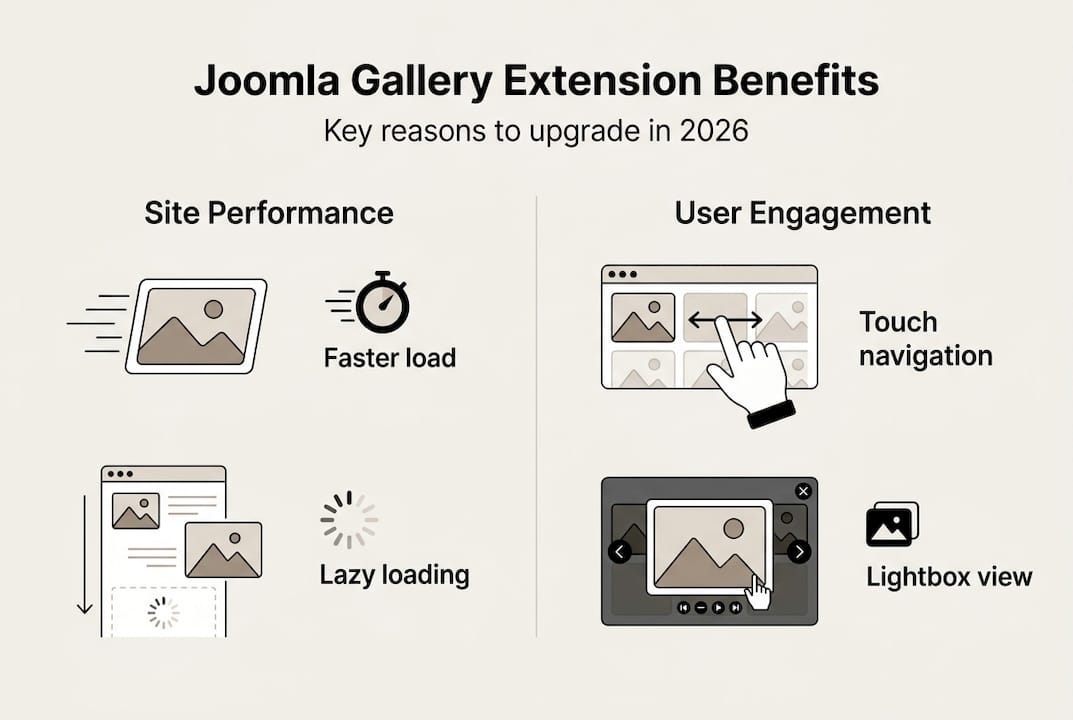
Image optimization in quality extensions operates on multiple levels. They automatically generate appropriately sized thumbnails for gallery views, serve responsive images matching visitor screen dimensions, and convert files to modern formats like WebP when browsers support them. This eliminates the common mistake of loading full-resolution images for thumbnail displays, which wastes bandwidth and delays rendering. Extensions with built-in compression algorithms reduce file sizes by 40-70% without visible quality degradation.
SEO benefits extend beyond speed improvements to structured data implementation. Advanced extensions automatically generate JSON-LD schema markup for image galleries, helping search engines understand your content context and display rich results in search listings. They create descriptive filenames from image titles, populate alt attributes for accessibility and SEO, and generate XML sitemaps specifically for image content. These optimizations increase the likelihood your images appear in Google Image Search results, driving additional traffic.
User engagement improvements manifest through interactive features that encourage exploration and sharing. Extensions with smooth lightbox transitions, keyboard navigation, and fullscreen modes create immersive viewing experiences that keep visitors on your site longer. Social sharing buttons integrated directly into gallery interfaces make it effortless for users to distribute your content across their networks. Comment systems and rating features transform passive viewing into active participation.
Sites implementing optimized gallery extensions typically see 25-35% improvements in page load speed and 15-20% increases in average session duration compared to basic image implementations.
Lazy loading configuration within gallery extensions ensures images load only when visitors scroll them into view, dramatically reducing initial page weight. This technique particularly benefits mobile users on limited data plans and improves perceived performance by prioritizing above-the-fold content. Combined with browser caching directives and CDN integration, these optimizations create gallery experiences that feel instantaneous regardless of image quantity.
Pro Tip: Enable progressive JPEG encoding in your gallery extension settings. This allows images to display in low resolution immediately while higher quality versions load in the background, creating the perception of faster performance.
Consider these implementation strategies for maximum impact:
- Configure automatic image resizing based on common device breakpoints
- Enable lazy loading with appropriate threshold distances
- Implement preloading for the first 3-5 gallery images
- Use content delivery networks for image asset distribution
- Monitor Core Web Vitals metrics to measure performance improvements
Implementing gallery extensions effectively: best practices and common pitfalls
Successful gallery extension implementation begins with methodical selection and testing processes that prevent compatibility issues and performance problems. Proper configuration and regular updates are crucial for security and performance when using Joomla gallery extensions, yet many administrators rush installation without adequate preparation. Following structured deployment procedures protects your site while maximizing extension benefits.
The selection process should start with defining your specific requirements. Create a checklist covering image volume, media types, required features, and budget constraints. Download trial versions or demos of candidate extensions to test functionality in staging environments before committing to purchases. Verify compatibility with your Joomla version, PHP version, and existing extensions through developer documentation and user forums.
Follow this installation and setup sequence for optimal results:
- Create a complete site backup including database and files before any installation.
- Review server requirements and verify your hosting meets minimum specifications for memory and PHP extensions.
- Install the gallery extension through Joomla’s extension manager using the official download package.
- Configure basic settings including image upload directories, thumbnail dimensions, and default display options.
- Test gallery creation with a small image set to verify functionality before bulk uploads.
- Optimize performance settings including caching, lazy loading, and compression parameters.
- Review frontend display across multiple devices and browsers to confirm responsive behavior.
- Document your configuration settings and customizations for future reference.
Configuration for performance and user experience requires balancing quality with loading speed. Set thumbnail dimensions appropriate for your layout without excessive resolution. Enable progressive enhancement features that provide basic functionality to all browsers while adding advanced effects for modern ones. Configure appropriate cache expiration times balancing freshness with performance. Test different compression quality settings to find the optimal balance for your image types.
Regular maintenance ensures continued security and compatibility as Joomla and PHP evolve. Check for extension updates monthly through your Joomla administrator panel. Review developer changelogs to understand what each update addresses before applying them. Test updates in staging environments when possible, especially major version upgrades. Monitor error logs for warnings or deprecated function notices that signal compatibility issues requiring attention.
Common pitfalls include selecting feature-bloated extensions that slow your site, neglecting mobile optimization testing, and failing to optimize images before upload. Many administrators assume extensions handle all optimization automatically, but pre-upload compression and proper naming still matter. Avoid installing multiple gallery extensions simultaneously, which creates conflicts and confusion. Don’t ignore security updates or continue using abandoned extensions that no longer receive developer support.
Pro Tip: Before installing any new extension, backup your Joomla site completely. Use Akeeba Backup or similar tools to create restoration points that let you quickly recover if installation causes unexpected issues.
Maintenance best practices for ongoing success:
- Schedule monthly checks for extension updates and security patches
- Monitor site performance metrics to detect degradation from configuration changes
- Review gallery analytics to understand which content engages visitors most
- Periodically audit installed extensions and remove unused ones
- Test gallery functionality after Joomla core updates
- Maintain documentation of custom configurations and modifications
For comprehensive guidance on managing Joomla extensions effectively, explore guides for Joomla extension management that cover installation, configuration, and troubleshooting strategies.
Explore premium Joomla gallery extensions for your site
Transforming your Joomla site’s multimedia presentation requires tools designed specifically for professional results and reliable performance. AllForJoomla specializes in premium Joomla modules and plugins that deliver the advanced gallery features discussed throughout this guide, backed by expert support and regular compatibility updates. Our extensions prioritize the balance between powerful customization and user-friendly interfaces that small business administrators need.
Exploring premium options means accessing galleries optimized for speed, SEO, and engagement without the trial-and-error of free alternatives. Our multimedia display extensions integrate seamlessly with Joomla’s latest versions while maintaining backward compatibility for sites not yet upgraded. Each extension receives continuous development ensuring security patches, feature enhancements, and adaptation to evolving web standards. When you invest in quality gallery tools, you gain not just software but ongoing partnership in your site’s success.
Discover how professional gallery extensions elevate your Joomla site by browsing our Joomla extension marketplace, where you’ll find detailed comparisons, feature demonstrations, and implementation guides designed for administrators at every skill level.
Premium Joomla extensions from trusted developers provide the reliability, support, and performance optimization that free alternatives often cannot match, making them essential investments for serious site administrators.
FAQ
What are gallery extensions in Joomla?
Gallery extensions are specialized add-ons that enhance Joomla’s image and multimedia display capabilities beyond the platform’s basic media manager. They provide advanced features like responsive layouts, lightbox effects, automatic optimization, and interactive navigation that improve both visual presentation and user experience. These tools automate complex tasks such as thumbnail generation and batch uploading while offering extensive customization options.
Can gallery extensions improve my Joomla website’s SEO?
Yes, optimized gallery extensions significantly improve SEO through faster load times, automatic image compression, and structured data markup that helps search engines understand your content. They generate proper alt attributes, create image sitemaps, and implement responsive serving that Google rewards in rankings. Extensions with lazy loading and modern format support directly impact Core Web Vitals metrics that influence search visibility.
Are gallery extensions difficult to install and manage?
Most modern Joomla gallery extensions are designed for straightforward installation through the standard extension manager with user-friendly configuration interfaces. Quality extensions include visual setup wizards, comprehensive documentation, and video tutorials that guide administrators through initial configuration and ongoing management. Following best practices like testing in staging environments and maintaining regular backups ensures smooth operation without technical complications.
What features should I look for in a Joomla gallery extension?
Prioritize responsive design that adapts to all devices, customization options matching your brand aesthetic, and SEO features including schema markup and image optimization. Look for multimedia support if you need video or audio galleries, intuitive management interfaces for easy content updates, and active developer support with regular compatibility updates. Performance features like lazy loading, caching, and CDN integration are essential for maintaining fast load times.
Can gallery extensions handle video and other media formats?
Many modern gallery extensions support mixed media galleries that combine images, videos, audio files, and even embedded content from platforms like YouTube and Vimeo. These multimedia suites recognize that contemporary websites require flexible presentation options beyond static images. When selecting extensions for video support, verify they handle your preferred formats, offer appropriate player controls, and maintain performance optimization across media types.