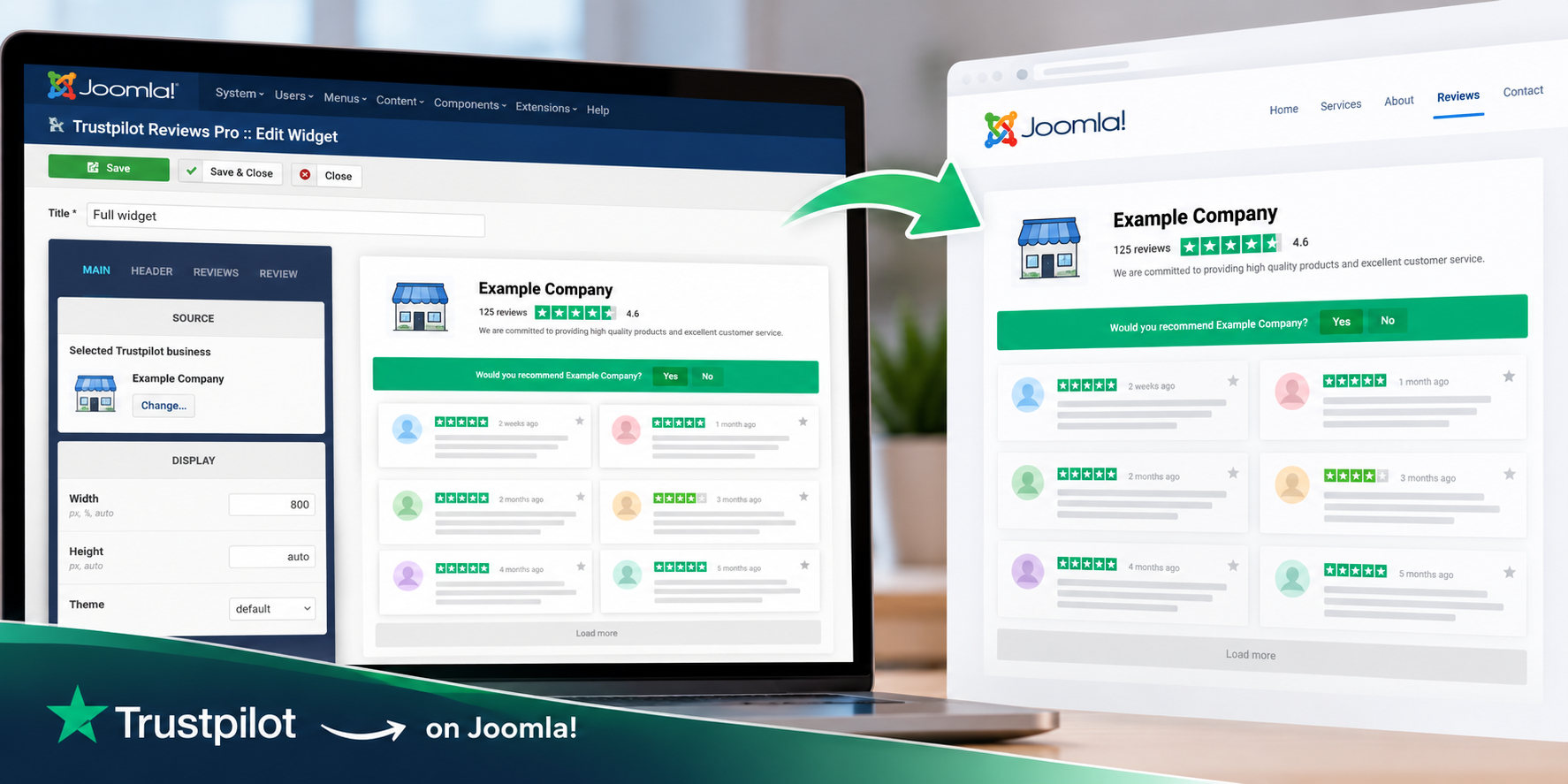
You can add Trustpilot reviews to a Joomla website without creating your own Trustpilot API integration or writing custom code. With Trustpilot Reviews Pro, you select your Trustpilot business, configure the reviews widget in Joomla Administrator, preview the result and publish it on your website using a shortcode.
In this guide, we'll go through the complete process — from creating the widget to displaying your Trustpilot reviews on a Joomla page.
🧭 What You Need Before You Start
Before adding Trustpilot reviews to Joomla, you need a Joomla website, a Trustpilot business profile and Trustpilot Reviews Pro installed on your site.
- A working Joomla website
- A Trustpilot business profile you want to display
- Trustpilot Reviews Pro installed and enabled
You do not need to obtain or configure your own Trustpilot API key, and no custom programming is required for the setup described below.
🚀 How to Add Trustpilot Reviews to Joomla
1. Install and Enable Trustpilot Reviews Pro
Start by installing Trustpilot Reviews Pro on your Joomla website. After installation, make sure the extension is enabled and activated before creating your first widget.
If you need detailed installation, activation or configuration instructions, see the Trustpilot Reviews Pro documentation .
2. Create a New Trustpilot Reviews Widget
Open Trustpilot Reviews Pro in Joomla Administrator and create a new widget. The widget editor is where you select the Trustpilot business, choose what information to display and configure how the reviews will look on your website.
3. Select Your Trustpilot Business
Use the business search inside Trustpilot Reviews Pro to find the Trustpilot company whose information and reviews you want to display.
Once the correct business is selected, the widget can use its Trustpilot information as the source for the company profile and customer reviews displayed on your Joomla website.
4. Choose What You Want to Display
Next, configure the information that should appear in the widget. Depending on the widget configuration, you can combine Trustpilot company information with individual customer reviews.
For example, a widget can show the company name, logo, Trustpilot rating and review count together with customer reviews, or you can create a simpler layout focused mainly on the reviews.
This makes it possible to create different Trustpilot widgets for different areas of the same Joomla website instead of using one identical review block everywhere.
5. Customize the Reviews Widget
Use the visual builder to configure how the Trustpilot reviews should appear. Trustpilot Reviews Pro provides Grid, Masonry and Slider layouts, together with light and dark themes and customizable review templates.
The instant preview updates while you change the widget settings, so you can check the result before publishing it on the frontend of your website.
6. Copy the Widget Shortcode
When the widget is ready, save it and copy its generated shortcode. The shortcode identifies the widget configuration you created and allows Joomla to render that widget wherever the shortcode is placed.
This also means that the widget configuration remains managed from Trustpilot Reviews Pro: if you later change its layout or display settings, you do not need to rebuild the review section manually.
7. Add the Trustpilot Widget to Your Joomla Website
Paste the generated shortcode into the Joomla content where you want the Trustpilot reviews to appear.
Depending on how your website is structured, the widget can be placed in a Joomla article, module or another supported content position. This allows you to use Trustpilot reviews on individual landing pages as well as in more permanent areas of the website.
Save the Joomla content and open the page on the frontend. Your configured Trustpilot reviews widget should now appear in the selected position.
👀 Preview the Trustpilot Widget Before Publishing
If you want to see how different configurations look before setting up your own widget, visit the Trustpilot Reviews Pro Demo.
The demo includes several live widget configurations, including a full reviews widget, a more compact Spotlight-style configuration and a dark theme. You can also use the interactive Admin Demo to experiment with the widget editor and preview.
📍 Where Can You Display Trustpilot Reviews?
There is no single required position for a Trustpilot reviews widget. The best location depends on where reviews are useful in the context of your website.
Common placements include:
- ✅ your homepage;
- ✅ product or service pages;
- ✅ landing pages;
- ✅ a dedicated testimonials or reviews page;
- ✅ areas close to contact, enquiry or booking actions.
You can also create multiple widgets with different configurations. For example, a compact Slider may work well on a homepage, while a larger Grid or Masonry layout can be used on a dedicated reviews page.
🛡️ Optional: Use GDPR-Friendly Media Loading
Trustpilot Reviews Pro also supports GDPR-Friendly Media Loading for supported media. When enabled, supported external media can be downloaded by your Joomla website and served from your own server instead of being requested directly from third-party media servers in the visitor's browser.
This can help reduce direct connections between website visitors and external media servers. For a detailed explanation of how the technology works, see GDPR-Friendly Media Loading for Joomla .
GDPR-Friendly Media Loading is a technical mechanism for changing how supported media is delivered; it should not be interpreted as a guarantee that a complete website is automatically GDPR compliant.
✅ Trustpilot Reviews Are Now Part of Your Joomla Website
Once the shortcode is published, the Trustpilot widget becomes part of your Joomla content while its configuration remains manageable from Joomla Administrator.
The complete workflow is straightforward: select your Trustpilot business, configure what should be displayed, customize the widget, preview it and publish the generated shortcode wherever you want the Trustpilot reviews to appear.
If you want to explore all available layouts, filtering options, company information and other widget capabilities, see Trustpilot Reviews Pro for Joomla.
❓ Frequently Asked Questions
Can I display Trustpilot reviews on a Joomla website?
Yes. Trustpilot Reviews Pro lets you select a Trustpilot business and display its customer reviews directly on a Joomla website using a configurable widget.
Do I need a Trustpilot API key?
No. You do not need to obtain or configure your own Trustpilot API key to use Trustpilot Reviews Pro.
Do I need to write code to add the reviews?
No. The widget is configured from Joomla Administrator and published using the generated shortcode.
Can I add Trustpilot reviews inside a Joomla article?
Yes. The generated widget shortcode can be placed in Joomla content, including articles, where supported by your Joomla configuration.
Can I create more than one Trustpilot reviews widget?
Yes. You can create multiple widgets with different layouts, settings and display configurations for different parts of your Joomla website.
Can I display my Trustpilot rating together with the reviews?
Yes. A widget can display Trustpilot business information such as the company name, logo, rating and review count together with customer reviews.
Can I preview the widget before publishing it?
Yes. The visual builder provides an instant preview while you configure the widget, allowing you to check the layout and displayed information before publishing it.











