Facebook Pages, personal Profiles and Groups can look surprisingly similar, but they represent different types of Facebook presence and are designed for different purposes.
This distinction becomes especially important when you want to connect Facebook to another service or display Facebook content on a website. A business called “Example Café”, for instance, might have a Facebook Page, a personal Profile created under the business name, a customer Group — or all three.
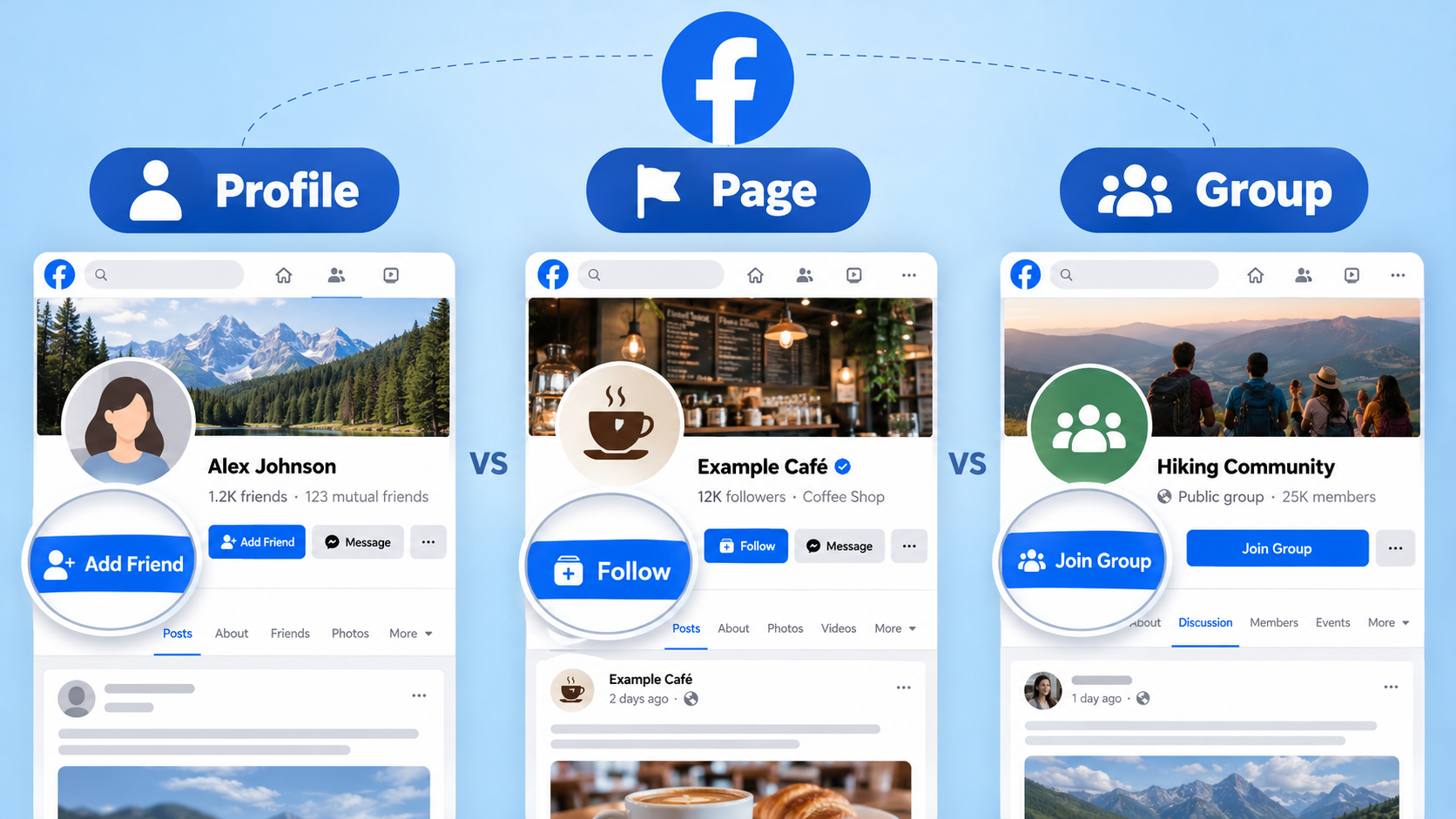
In this guide, we will explain what Facebook Pages, Profiles and Groups are, how to recognize each one, and which signs you can use when the Facebook interface does not make the difference immediately obvious.
Facebook Page, Profile and Group at a Glance
| Facebook Profile | Facebook Page | Facebook Group | |
|---|---|---|---|
| Main purpose | Represent an individual person | Represent a business, brand, organization, public figure or other public presence | Create a community around a shared interest, topic or organization |
| People connect by | Friends and, in some cases, followers | Following the Page | Joining the Group |
| Typical identifying elements | Friends, mutual friends, personal About information | Page category, business/contact information, action buttons, followers | Members, Join button, Public Group or Private Group label |
| URL clue | Often facebook.com/username | Often facebook.com/pagename or another Page URL | Usually contains facebook.com/groups/ |
These are useful indicators, but no single visual element should always be used by itself. Facebook regularly changes its interface, and some features that were once unique to Pages are now also available to personal Profiles.
What Is a Facebook Profile?
A Facebook Profile represents an individual person.
It is the identity a person normally uses when signing in to Facebook, connecting with friends, posting personal updates, joining Groups and managing Facebook Pages.
Facebook Profiles commonly include personal information such as:
- friends and mutual friends;
- work and education;
- places lived;
- personal photos and posts;
- relationship and other personal information, depending on privacy settings.
A common sign that you are viewing a Profile is an Add Friend or Friends control.
However, privacy settings can hide some of these elements, so the absence of an Add Friend button does not automatically mean that you are looking at a Page.
What About Facebook Professional Mode?
This is one of the main reasons Facebook Profiles and Pages are sometimes difficult to distinguish.
Facebook allows eligible personal Profiles to use Professional Mode. A Profile using Professional Mode can have public followers and access professional or creator-oriented features while remaining a personal Profile.
Professional Mode does not turn the Profile into a Facebook Page.
This means that the following rule is no longer reliable:
“If it has followers, it must be a Facebook Page.”
Both Pages and Profiles can have followers.
Meta provides more information about following Profiles and Pages in its Facebook Help Center.
What Is a Facebook Page?
A Facebook Page is a public Facebook presence intended for entities such as businesses, brands, organizations, products, creators and public figures.
A Page is separate from the personal Profile of the person who created or manages it. One or more people can be given access to manage the Page without sharing a personal Facebook login.
For a business, a Facebook Page may contain information such as:
- business category;
- website;
- phone number or other contact information;
- address and opening hours;
- action buttons such as Send Message or Contact Us;
- followers;
- business posts, photos and videos.
Pages are therefore normally the appropriate Facebook presence for a company, restaurant, hotel, shop, organization or brand.
A Facebook Page Can Look Like a Profile
Modern Facebook Pages use an interface that can look very similar to a personal Profile. Pages have profile pictures, cover images, posts, followers and their own identity when interacting on Facebook.
People with Page access can also switch into the Page and use Facebook as that Page.
For this reason, the general appearance of the timeline is not enough to determine whether something is a Page or Profile.
What Is a Facebook Group?
A Facebook Group is a community space where people communicate around a shared interest, activity, organization or topic.
Unlike a Page, where the Page itself is normally the central publisher, a Group is structured around participation by its members or other permitted participants.
Typical examples include:
- a local community Group;
- a customer support or product community;
- a hobby Group;
- a professional community;
- a neighborhood Group;
- a private Group for members of an organization.
Public and Private Facebook Groups
Facebook Groups can have different privacy settings.
In a public Group, Group content can generally be visible publicly. In a private Group, access to Group content is restricted to members according to the Group's settings.
When looking at a Facebook Group, you will commonly see information such as:
- Public group or Private group;
- the number of members;
- a Join Group or similar membership control;
- Group rules or information about administrators;
- posts from multiple members or participants.
Facebook's current Group joining rules are explained in the Facebook Help Center.
How to Tell If You Are Looking at a Facebook Page, Profile or Group
If you are unsure what type of Facebook presence you have opened, use several of the following checks together.
1. Look for a Join Button and Member Count
This is usually the easiest way to recognize a Facebook Group.
If Facebook displays:
- Join Group;
- a member count;
- Public group or Private group;
you are almost certainly looking at a Facebook Group.
2. Check the Facebook URL
Group URLs normally contain:
facebook.com/groups/...
This is a strong indication that the link points to a Facebook Group.
Unfortunately, URLs are much less useful for distinguishing a Page from a personal Profile.
Both can use short addresses similar to:
facebook.com/example
So a clean Facebook username URL does not prove that the source is a Page.
3. Look for Friends or Add Friend
A personal Profile is built around Facebook's friend relationship.
If you see:
- Add Friend;
- Friends;
- mutual friends;
- a Friends section;
you are most likely looking at a personal Profile.
Remember that privacy settings can hide some of these elements.
4. Look for Business or Page Information
A Facebook Page will often contain signals associated with the entity it represents, such as:
- a business or organization category;
- website and contact details;
- opening hours or an address;
- business-oriented action buttons;
- Page transparency or other Page-specific information.
These are stronger indicators of a Page than simply seeing a follower count.
5. Do Not Use Followers as the Only Test
Historically, one easy explanation was that Profiles had friends while Pages had followers.
That distinction is no longer sufficient.
A personal Profile — particularly one using Professional Mode — can also have followers. Therefore:
- followers + no other evidence does not prove that it is a Page;
- friends strongly suggests a Profile;
- members / Join Group strongly suggests a Group.
Common Situations That Cause Confusion
A Business Name Does Not Automatically Mean It Is a Facebook Page
Some businesses create a personal Facebook Profile using the company name instead of creating a Page.
It may display the company's logo, business name and promotional posts, but if it is structurally a personal Profile, it is still a Profile.
The content of the account does not determine its Facebook object type.
A Public Figure Can Have Both a Profile and a Page
A creator, artist or public figure may have a personal Profile — possibly using Professional Mode — and also maintain a separate Facebook Page.
Both may have followers, similar photos and similar names.
In these situations, use the structural indicators described above rather than relying on the name or follower count.
A Business Can Have Both a Page and a Group
These serve different purposes.
For example, a company might operate:
- a Facebook Page for official news, photos and announcements;
- a Facebook Group where customers discuss the product or communicate with each other.
The fact that both belong to the same business does not make them the same type of Facebook source.
Why the Difference Matters When Connecting Facebook to Joomla
Knowing whether a Facebook URL belongs to a Page, Profile or Group is important when connecting Facebook content to a Joomla website.
Facebook Feed Pro is designed to connect to Facebook Pages that you manage and authorize through Facebook.
During the connection process, you authorize Facebook access and select the Facebook Page you want the widget to use.
The extension can then display Facebook Page posts, photos, albums and videos on your Joomla website.
If the Facebook presence you are trying to use is actually a personal Profile or Facebook Group, you should not assume that it is a Page simply because it has a public URL, a business name or many followers.
If you are setting up the extension, see our complete guide: How to Add a Facebook Feed to a Joomla Website.
Quick Facebook Page vs Profile vs Group Checklist
If you need to identify a Facebook source quickly, use this checklist:
- Does the URL contain /groups/? → It is a Group.
- Does it show Join Group, members, Public group or Private group? → It is a Group.
- Does it show Add Friend, Friends or mutual friends? → It is probably a personal Profile.
- Does it contain Page/business category, contact details and business-oriented controls? → It is probably a Page.
- Does it only show followers? → That is not enough to decide; Profiles with Professional Mode can also have followers.
When in doubt, use several indicators together rather than relying on a single button or visual element, because Facebook's interface and available features change over time.
Frequently Asked Questions
Is a Facebook Page the same as a Facebook Profile?
No. A personal Profile represents an individual person, while a Facebook Page is a separate presence commonly used for businesses, brands, organizations, creators and public figures.
Can a personal Facebook Profile have followers?
Yes. Personal Profiles can have followers, and Professional Mode provides additional public-following and professional features. Having followers therefore does not automatically mean that an account is a Facebook Page.
How can I quickly recognize a Facebook Group?
Look for a URL containing /groups/, a Join Group button, a member count and a Public Group or Private Group label. These are strong indicators that you are viewing a Group.
Can a business have both a Facebook Page and a Facebook Group?
Yes. A Page can act as the business's official public presence, while a Group can provide a community where members communicate around the business, product or shared interest.
Does Professional Mode turn a Facebook Profile into a Page?
No. Professional Mode adds professional and public audience features to an existing Profile, but the Profile remains a Profile.
Which Facebook source should I use with Facebook Feed Pro?
Facebook Feed Pro uses Facebook Pages that you manage and authorize during the Facebook connection process. If you are unsure whether your Facebook source is actually a Page, use the checks above before configuring the widget.











