Yes, you can display Facebook reviews and recommendations on a Joomla website. The most practical approach is to use a Joomla extension that connects to your Facebook Page, creates a customizable reviews widget and lets you publish that widget inside your Joomla content.
Facebook currently uses the term Recommendations for much of its Page feedback system, while website owners and users still commonly search for Facebook Reviews. In practice, both terms refer to the customer feedback associated with a Facebook Page.
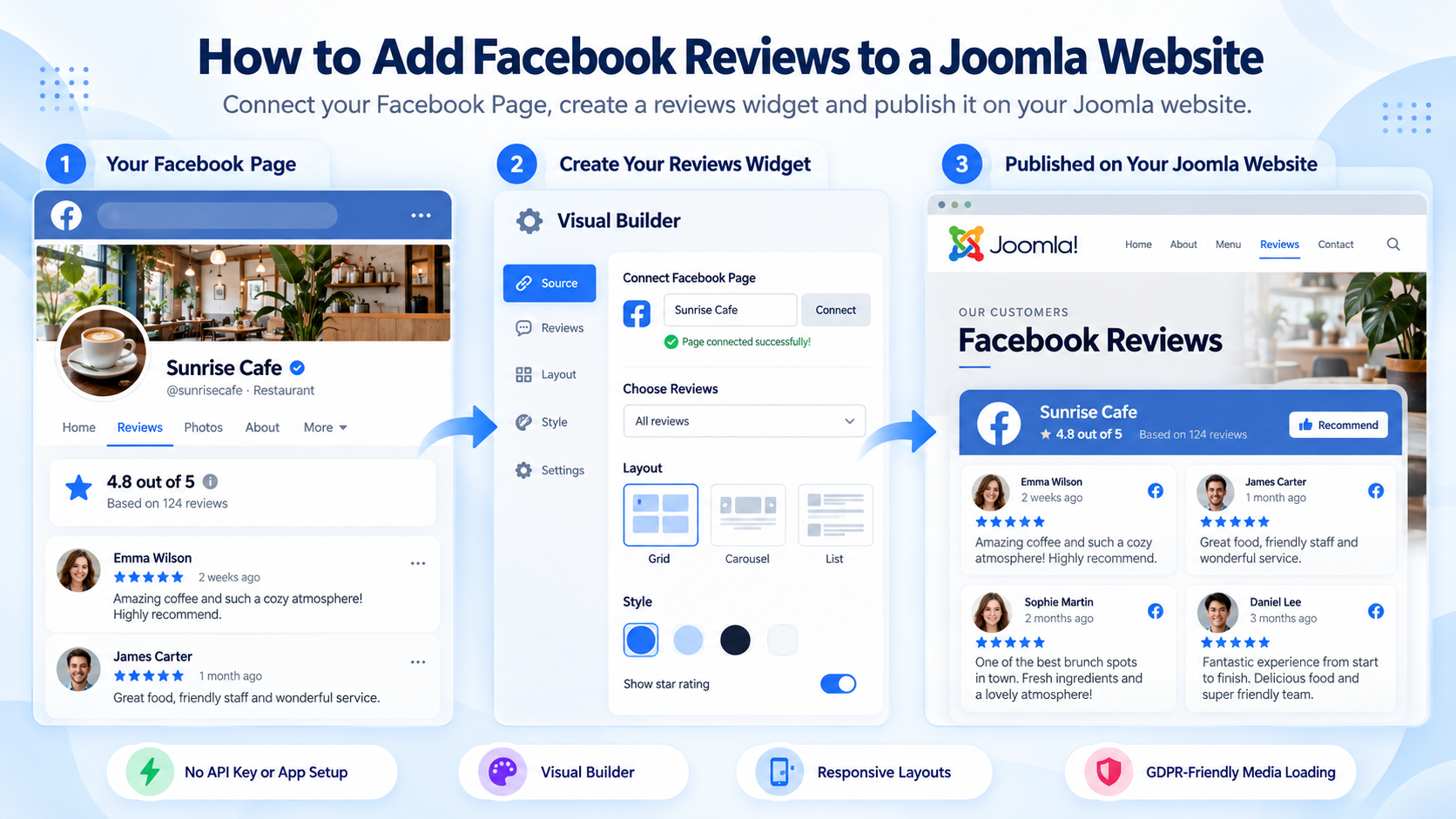
Can You Embed Facebook Reviews Directly on a Joomla Website?
Facebook provides ways to embed some types of Facebook content, but this is not the same as having a complete Facebook reviews widget that automatically retrieves and presents feedback from a Facebook Page.
Manually embedding or copying individual reviews may work when you only need one or two testimonials. It becomes difficult to maintain when you want to show a larger collection of reviews, control their appearance, filter what is displayed or keep the content connected to the original Facebook Page.
A dedicated Joomla extension solves a different problem: it connects Joomla to the Facebook Page, retrieves the available review or recommendation data and creates a widget that can be configured and reused throughout the website.
How to Add Facebook Reviews to Joomla
The basic process is straightforward: install the extension, connect the Facebook Page, configure the reviews widget and publish it where you want the reviews to appear.
Step 1: Install a Facebook Reviews Extension for Joomla
Facebook Page Reviews for Joomla by AllForJoomla is a Joomla extension for creating and configuring Facebook Page reviews and recommendations widgets.
Install the extension through the standard Joomla extension installer. Once installed, you can create one or more review widgets from the Joomla administration area.
The extension itself is responsible for connecting to Facebook and configuring the data. The resulting widget is what is later displayed on the Joomla website.
Step 2: Connect Your Facebook Page
Open the Facebook Page Reviews component and connect your Facebook account.
You do not need to create your own Facebook App or configure your own Facebook API key. The connection is handled through the extension.
After authorization, select the Facebook Page whose reviews or recommendations you want to display.
The connected Facebook account must have the required access to that Page. A Facebook Page that is not available to the connected account cannot be selected as the widget source.
Step 3: Choose Which Reviews or Recommendations to Display
You do not necessarily have to show every available review.
Facebook Page Reviews includes filtering controls that let you determine which feedback should be included in the widget. This is useful when you need a review collection that fits a particular page, service or presentation.
You can also control how many reviews are initially displayed and allow visitors to load additional reviews when needed.
Step 4: Customize the Facebook Reviews Widget
The extension includes a Visual Builder with an instant preview, so you can see the result while configuring the widget.
Available layout options include:
- ✅ Grid
- ✅ Masonry
- ✅ Slider
You can also configure the presentation of individual reviews, the Page header, spacing, colors and responsive behavior.
Responsive layout controls allow the same widget to adapt to different screen widths instead of requiring separate desktop and mobile versions.
If you want to see how the available layouts look in practice, see the Facebook Page Reviews examples.
Step 5: Enable GDPR-Friendly Media Loading
Facebook review widgets may contain images such as reviewer profile pictures. Normally, those images can be loaded directly from Facebook servers in the visitor's browser.
Facebook Page Reviews also provides GDPR-Friendly Media Loading. To enable it, set:
Images Display Mode → Download and display from this website server (GDPR-Friendly Media Loading)
With this mode enabled, supported Facebook images are downloaded and displayed through your Joomla website server instead of being requested directly from Facebook servers by the visitor's browser.
This reduces direct third-party media requests. It should not be interpreted as a general guarantee that the entire website is GDPR compliant, because compliance depends on the website's complete configuration and data-processing setup.
For a more detailed explanation, see how GDPR-Friendly Media Loading works in Joomla.
Step 6: Publish the Widget on Your Joomla Website
After configuring and saving the widget, Facebook Page Reviews generates a shortcode for it.
Copy the shortcode and place it in the Joomla article, module or other supported content area where the reviews should appear.
The workflow is therefore:
Facebook Page Reviews extension → creates and configures the widget → shortcode publishes the widget → visitors see it on the Joomla website.
For detailed installation, configuration and troubleshooting instructions, see the Facebook Page Reviews documentation.
What Can a Facebook Reviews Widget Display?
A Facebook reviews widget can combine individual customer feedback with information about the Facebook Page itself.
Facebook Page Reviews can display information including:
- reviewer name;
- reviewer profile image;
- review or recommendation text;
- publication date;
- Facebook Page name;
- Page rating and recommendation information;
- multiple reviews in a configurable layout.
The exact presentation depends on the widget settings you choose in the Visual Builder.
Facebook Reviews vs Facebook Recommendations
The terms Facebook Reviews and Facebook Recommendations are often used for the same general type of Facebook Page feedback, but the terminology has changed over time.
Facebook moved its Page feedback system toward Recommendations, where users can recommend or not recommend a business and optionally add written feedback. At the same time, users, website owners and third-party tools still commonly refer to this content as Facebook reviews.
That is why you may encounter all of these phrases:
- Facebook Reviews;
- Facebook Page Reviews;
- Facebook Recommendations;
- Facebook Page Recommendations;
- Facebook reviews widget.
For a website owner, the practical distinction is usually less important than the underlying goal: displaying real customer feedback from a Facebook Page on the website.
Do You Need a Facebook API Key?
No. Facebook Page Reviews by AllForJoomla does not require you to create your own Facebook API key or set up your own Facebook App.
You connect the Facebook account through the extension and select an available Facebook Page.
This removes one of the more technical parts of building a Facebook reviews integration manually.
Where Should You Display Facebook Reviews?
Facebook reviews are most useful where visitors are already evaluating whether they trust a business, service or offer.
Common placements include:
- Homepage — provide social proof early in the visitor journey.
- Service pages — show customer feedback close to the service being considered.
- Landing pages — reinforce an offer with existing customer experiences.
- Contact or location pages — add confidence before a visitor contacts or visits the business.
- Near important calls to action — support the decision without interrupting the primary content.
Reviews should support the page rather than dominate it. The best location depends on the page purpose and the amount of social proof already present.
For more ideas about placement and presentation, see how to use Facebook Recommendations effectively on Joomla websites.
Facebook Reviews Widget vs Manually Added Testimonials
Both methods can be useful, but they solve different problems.
| Feature | Facebook Reviews Widget | Manual Testimonials |
|---|---|---|
| Content source | Connected Facebook Page | Content manually added to Joomla |
| Adding new reviews | Retrieved from the connected source | Each testimonial must be added manually |
| Reviewer information | Can use information provided with the Facebook feedback | Depends on what you manually enter |
| Filtering | Available through widget configuration | Controlled manually by editing the content |
| Layout | Configured through the widget | Depends on the Joomla template or custom markup |
| Maintenance | Lower once the source and widget are configured | Requires ongoing manual editing |
Manual testimonials offer complete control over the exact content and design. A Facebook reviews widget is more useful when you want the displayed feedback to remain connected to a real Facebook Page and avoid manually recreating every review inside Joomla.
Facebook Reviews for Joomla FAQ
Can I display Facebook reviews on Joomla?
Yes. You can use a Joomla extension such as Facebook Page Reviews to connect a Facebook Page, create a reviews widget and publish that widget on your Joomla website.
How do I embed Facebook Page reviews in Joomla?
Install Facebook Page Reviews, connect your Facebook account, select the required Page, configure the widget and copy its generated shortcode into the Joomla content area where you want the reviews to appear.
Are Facebook Reviews and Facebook Recommendations the same thing?
They refer to closely related Facebook Page feedback. Facebook currently uses Recommendations as part of its Page feedback system, while users and website owners still commonly use the term Facebook Reviews.
Do I need a Facebook API key or Facebook App?
No. Facebook Page Reviews does not require you to create your own Facebook API key or configure your own Facebook App.
Why are my Facebook reviews not showing?
First check that the correct Facebook account is connected and that it has access to the required Facebook Page. Also check the widget's review filters, review limits and cache settings, because these can affect which feedback is displayed.
Can Facebook reviews update without manually copying them into Joomla?
Yes. The extension retrieves review data from the connected Facebook Page, so you do not need to manually recreate each review as Joomla content. How quickly changed Facebook data appears on the website can depend on the configured cache settings.
Can I customize which Facebook reviews are displayed?
Yes. Facebook Page Reviews includes filtering controls that let you control which available reviews or recommendations are included in the widget.
Does the Facebook reviews widget work on mobile devices?
Yes. Facebook Page Reviews includes responsive layout controls that allow the widget to adapt to different screen sizes.
What does GDPR-Friendly Media Loading do?
GDPR-Friendly Media Loading downloads supported Facebook images and serves them through your Joomla website server instead of loading those images directly from Facebook servers in the visitor's browser.











